Twitch clip automation for creators who clip often

Cliprr watches streams live, cuts clips from real signals, and keeps the output in one sortable library.

The system runs a live monitor, applies thresholds and cooldowns, creates clips when activity clears the bar, supports a second pass through VODs when needed, and leaves the results in a review surface instead of dropping them into a dead export folder.

Watch the stream Run active monitor cards with thresholds, cooldowns, and visible session state.
Create the clip Let signal spikes trigger clips, then move straight into naming and output handling.
Keep the result Review saved outputs, VOD passes, and learning changes without leaving the product.
Reserved primary media

Homepage product demo video placeholder

This is intentionally reserved for the strongest future homepage asset: a short demo that shows live monitoring, clip packaging, VOD review, and library handoff in one sequence.

Real product proof

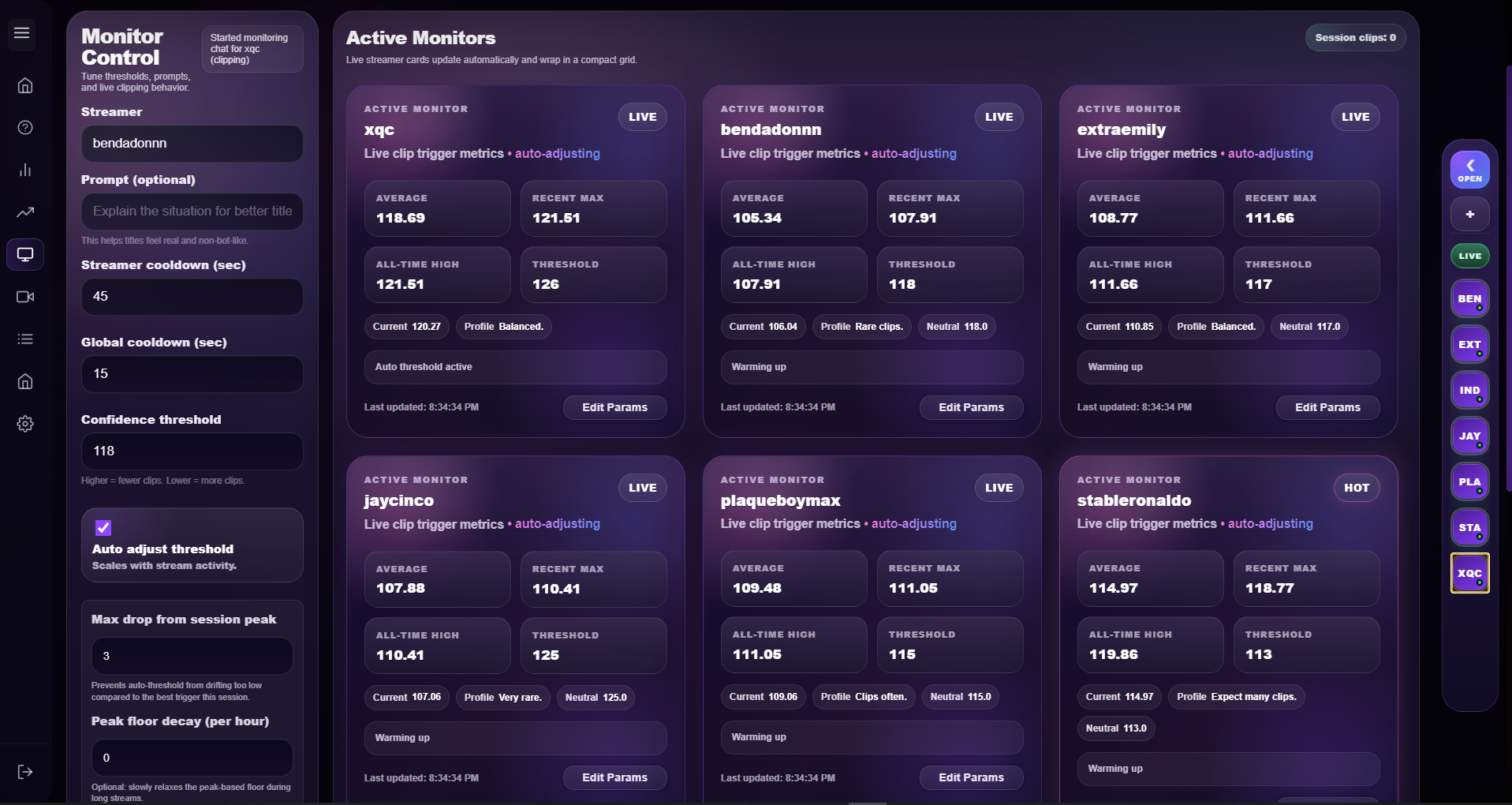
The monitor already looks like software, not a concept pitch.

Monitor workspace Live cards Threshold controls

The monitor shows the actual moving parts: confidence thresholds, cooldown timers, active monitor cards, and stream state while the session is running.

Cliprr short monitor workspace
Performance overview

The dashboard gives the product operational weight.

Output counts Queue state

Cliprr is not sold as invisible magic. It gives creators visible clip activity, publishing output, queue status, and learning insights that make the workflow easier to trust.

Cliprr dashboard
Why this feels more credible

The proof is in the surfaces where the operator actually works.

The useful claim is not that Cliprr "automates content." It is that you can see where live monitoring, review, learning, and saved outputs are handled.

Learning rules are reviewable before they change scoring.

Suggested adjustments stay visible first, so score changes can be reviewed before they affect what gets clipped.

The library keeps generated clips manageable after export.

Saved outputs remain sortable, reviewable, and removable after generation instead of vanishing into local clutter.

Longform support makes Cliprr more than a live-only tool.

When the live pass misses the cleanest moment, a second pass through the VOD can still produce usable output.

Workflow breakdown

A repeatable path from live session to retained clip output.

The point is not abstract efficiency. The point is getting from live stream or VOD to clips that can still be reviewed, sorted, and reused without rebuilding the process each time.

01 Live monitoring Run the monitor while the stream is live. Watch thresholds, signals, and cooldown behavior as the session moves.
02 VOD support Make a second pass when live capture is not enough. Review VOD blocks when longer content needs another look before output is final.
03 Packaging Move clips into a usable output flow. Handle naming, review state, and packaging without breaking the clipping sequence.
04 Library retention Keep clips visible after generation. Retain saved outputs in a library where they can be sorted, reused, or removed later.
Longform support

VOD block review stays inside the same product.

VOD review gives the workflow a second pass when the live run caught the right area but not the best final cut.

Cliprr VOD block selection
Reserved workflow media

Future creator workflow visual placeholder

A screenshot would flatten this section. It should become a literal creator workflow visual or motion sequence that shows how Cliprr sits beside the rest of the clipping setup.

Saved outputs

The clip library makes output feel managed.

Saved clips Review state

The library keeps saved outputs visible after generation so review, reuse, and cleanup stay part of the same workflow.

Cliprr clip library
Built for clipping-heavy workflows

Useful for solo streamers, clipping-heavy creators, and channels with real review load.

Cliprr fits people who clip often enough to care about thresholds, review surfaces, saved outputs, and whether the system stays controllable once clip volume goes up.

Solo streamer

Use Cliprr to watch a live stream, generate clips from clear signals, and keep the output reviewable after the stream ends.

Clipping-focused creator

Keep monitor tuning, VOD review, and saved clip cleanup in one tighter loop instead of splitting the work across tabs and folders.

Channel support workflow

Review output volume, tune scoring behavior, and keep higher clip frequency from turning into a messy handoff.

Reserved explainer media

Feature walkthrough media placeholder

This should become a tighter walkthrough asset that shows the workflow moving between monitor, VOD pass, and saved output handling. A screenshot here would make the page flatter.

FAQ and support

Answer practical workflow questions before asking for the install.

The homepage should already show that Cliprr has setup depth, review surfaces, and a support path before someone ever opens the dedicated FAQ page.

What does Cliprr actually automate?

Cliprr runs the live monitor, creates clips when signals clear the threshold, supports review work, and keeps saved outputs in one library.

Is Cliprr only for live clipping?

No. VOD and local-file review are there when the live pass needs a second look.

Are the screenshots from the actual product?

Yes. The screenshots on this site are real Cliprr product views used only where they help prove the workflow.

Clear next step

See the workflow, review the platform, then decide.

The goal is to show the real operating surfaces first so creators can judge whether Cliprr fits the way they already clip.